COOL. Retro Handset headset for your Cell Phone.

July 8, 2011

UPDATE: 8/29/11
Here’s the problem with this device that you might not notice.  It has a 2.5mm adapter which is fine if you have an old Motorola feature phone with those super-thin headset jacks.  But if you have a modern smartphone like a Windows Phone 7 device, you likely have a 3.5mm adapter.

So not a big deal right?  Just get an adapter and be done with it, right?  Not so much.  This is more than just a headset:  It’s a headset with a microphone.  So you need to get an adapter with microphone connectivity specifically for cellphones.  Trust me – this is a little harder to find than you might think.  Radio Shack doesn’t sell them near as I can tell for example, much less Best Buy.

imageFortunately, I found a place that sells this and bought one… and yes, it works – I’ve tested it. 

Here it is, but be aware:  It’s $9 + $3.95 shipping = $12.95.

http://www.factorydirectcellular.
com/home/universal/hf-adapter.htm

(CAREFUL!  You can easily select the wrong adapter.  Look for Universal 2.5mm and 3.5mm then select the 3.5mm Male to 2.5mm Female Stereo Adapter which should be about 4 items down)

—————-

imageYeah, this is awesome.  Bought this immediately.  Didn’t even think twice.

Old.  School.  Handset.  For.  Cell.  Phone.

  • 2.5mm jack will work with most phones (Motorola, LG, Samsung)
  • Small button built-in to handset for answer/end
  • Connection can also be made using a “hands free” type of adapter kit (not included)
  • No batteries required
  • Includes: handset and classic curly phone cord with connector
  • Works with Blackberry (except Curve and some newer models with 3.5mm connectors)
  • Does not work with RAZR or Nokia phones
  • Works with iPhone (using Apple iPhone TTY Adapter, available from Apple)
  • Now available in RED color

LINK:  Retro Handset for Cell phone:
https://www.thinkgeek.com/gadgets/cellphone/7830/


INFO: Top Eleven Features of Sugarsync Cloud Storage that I love

July 4, 2011

imageI know I should be ballyhooing Windows Live Mesh.  And yes, Mesh is AWESOME.  However I’ve been using Sugarsync as my cloud storage/ backup/ synchronization service for years now and it’s a great service.  My subscription is paid into the future and thus “sunk costs” so I don’t really see a need to switch to Mesh any time soon.

However, with the recent “Dropbox debacle” (Stop & go do some research if you don’t know what I’m talking about) I thought I’d write a bit about some of the great features of Sugarsync that people should take into consideration if they are planning on moving from Dropbox.

  1. Single Instance Storage
    Imagine uploading the .ISO of “Windows 7 w/ SP1 slipstreamed” to your cloud drive.  That’s a LARGE file so that’s gonna take a while right?  So you start the process and seconds later… BOOM.  It’s done.  No, really.  It’s done.  Someone else using Sugarsync already uploaded the same .ISO file and so YOU DON’T NEED TO.  The file is already there so you don’t need to spend hours uploading it from your network connection – you just get a pointer to the identical .ISO file that’s already been placed up there.  Same goes for .MP3s, MPEG4 videos, EXEs, PDFs, etc.
  2. Byte-level Differencing
    So you decided that you want to sync your 2GB Archive .PST file to your cloud storage.  It takes forever but whatever.  Then you make a modification to the .PST – say, you add a few messages to it.  Do you have to upload the entire 2GB .PST again?  NO.  Only the changes are needed to be replicated up to the cloud.  The sync takes less than a few seconds to complete and you’re now backed up again.
  3. Sync/Backup.  Any file.  Any folder.  Anywhere on your system.
    You’ve got a \DOCUMENTS, \PICTURES, \MUSIC, \VIDEOS, & \FAVORITES folder and they’re all in your Profile directory you want them all backed up.  But what if you also have a C:\CONFIDENTIAL directory and a D:\EXTRA\PHOTOS directory that you want synced?  No problem:  Sugarsync will synchronize ANY file, in ANY folder, ANYwhere on your system and you’re not confined to one lousy folder structure.
  4. Custom Replication Fabric.
    I don’t just want my WORK computer to be backed up to the cloud:  I want it stored in the cloud…
    …and I want my \FAVORITES to be synced to my HOME computer and my LAPTOP.
    …and I also want my \DOCUMENTS to be synced to my LAPTOP computer but not my home computer. 
    …and I want my \PICTURES to be synced between my WORK computer and my HOME computer but not my LAPTOP. 
    …and I want my \MUSIC to be synced between my HOME computer and my LAPTOP but not my WORK computer.
    No problem.  Complex replication fabrics are easy to configure and setup.
  5. Free Storage for Hooking Up Others.
    For every friend you refer to SugarSync, Sugarsync will give you both 500 MB of bonus space. If your friend joins a paid plan, you each get 10 GB storage EXTRA.  It’s totally win-win.  If you appreciated the work I did writing this up and want 10GB of extra storage, (for both of us!) please use the following referral link: 
    https://www.sugarsync.com/referral?rf=dg5i020wn9qp4 
  6. Web File Sharing… made easy.
    There are two scenarios in which you might want to share a file or set of files:
    1) Synced File:  The file is already synced to the cloud and you just want to give someone the ability to download it.  No problem – use the Sugarsync File Manager utility to right-mouse button click on the file and get a “public link”.  It’ll copy to your clipboard and that’s all there is to it.  Paste that link in email or IM to someone and they can download the file no problem.
    2) New file:  The file needs to be uploaded and shared.  No problem – there’s a special place called the “Web Archive” in the Sugarsync File Manager in which you can just upload content into your cloud storage (and NOT synchronize it) just for one-off- sharing.  Then again, right mouse click on the file and get a “public link”.  DONE.
  7. Secured File/Directory Sharing.
    ”But I don’t wanna have a public link that anyone can download from!”  Fine fine fine.  Just take the file or directory you want to share and click “Share”.  This will allow you to share a directory or file to a specific email address.  The user will need to register to Sugarsync and verify that they are the owner of that email address by receiving an email from the service but this has a nice consequence of introducing the person to the service and potentially getting you 500MB-10GB of free storage if they join up for either the free Sugarsync storage offer or a paid subscription.
  8. No limits.
    At least none that I can see.  There’s no network utilization limits.  (Although I’ve seen d/l bandwidth throttled to 3Mbps)  No file size limits.  (4GB .ISOs for example work for paid accounts)  No file count limits in directories.  No directory structure limits.  Again, as far as I can see, there’s no real limits to what you can do.  That’s cool.
  9. Manageable Upload/Download Speed.
    GAH!  I don’t want Sugarsync to consume all my upstream bandwidth when I have a lot to backup to the cloud… I have work to do!  No problem.  Sugarsync’s agent has a throttle on it to ensure that you can actually do things on the network OTHER than backup your files to the cloud.  It will leave bandwidth available for other things like email, surfing, etc.  Y’know:  Getting real work done.
  10. Windows Mobile Support. (And iPhone & Blackberry)
    This one’s for me:  I still have a Verizon HTC TouchPro 2 Windows Phone 6.5 device and Sugarsync has a CLIENT for WP6.5 that makes it easy to pull down any file necessary from the cloud.
  11. Past Versions.
    Holy crap.  I just overwrote my mission critical Powerpoint with crap and I don’t have a “Previous Versions” copy on my hard drive.  Hyperventilating… must… get… a… grip… 
    Wait.  I have Sugarsync.  There’s previous versions of my files already stored in the cloud.  Sugarsync keeps track of the last 5 versions for me so I don’t have to worry about local versioning.

And I don’t consider this a FEATURE so I’m not going to list it as such, but something else I love?

Price.
Get 60GB of storage online for $99/year.  Never have to worry about posting files to web servers to share with people… or worrying about backing up your data.  Too pricey?  Shuttle down to the 30GB plan.  Get 30GB of storage for $49/year.  Flat rate.  No bandwidth charges, no nothing.  Annual cloud storage & “piece of mind for your data” for the meager price of a business lunch.  Wary?  Try the FREE plan:
Get 5GB of storage for FREE.  That’s right.  Totally free.  They’re so sure you’re gonna upgrade (they got me) that they’re giving away 5GB to start out with for no charge.  No credit card required.

So, that’s my piece.  I’m a reasonably technical guy that has some reasonable technical requirements and if you’re like me, I’ll bet you have the same general needs.  Check it out:  5GB of storage is FREE.


Regarding the “Courier” that the media seems to love so much…

June 1, 2011

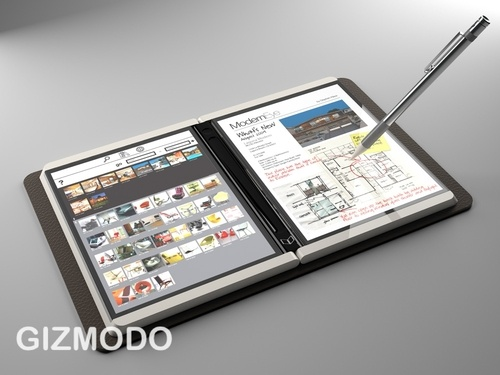
imageLet’s get this out of the way shall we?

The Courier was a bad idea.

Here’s the tale of the tape for the purported Microsoft “Courier” device that certain media reporters find so  fascinating and can’t seem to stop yapping about despite the thing being DOA for over a year now.

COMPONENTS:
Here’s a rough listing of the 3 most obvious components of the Courier that should have been red flags to anyone looking at the design.

  1. DUAL LCD SCREEN
    What’s the most expensive component on a tablet?  And now, what’s the most power hungry component of a tablet?  Yeah, that’s right – the backlit LCD.  And Courier had not one, but TWO LCD backlit displays.  And remember:  This was a device that was supposed to compete with other tablets like the iPad that have 10 hours of battery life and are priced at $599… and iPads have just ONE display with a cost of goods (COGs) of roughly $65 per LCD panel.  And now with Courier, you’re going to double those costs and eat up twice the power.  Wow.
    …$130 COGs on LCD screens.
  2. DUAL CAPACITIVE GLASS
    Now what’s the SECOND more expensive component on a touch screen device?  Now imagine having to buy TWO of them.  The capacitive glass that is on most tablets today cost roughly $30 and on the Courier we’re supposedly doubling those costs in order to support two screens.
    …$60 COGs on capacitive glass.
  3. DUAL ACTIVE DIGITIZER
    But there’s more!  Courier added Active Digitizers on both screens to enable stylus based data entry/signature capture.  This would be fine if the active digitizers from nTrig & Wacom were cheap… but they’re not.  Active Digitizers & stylii COGs generally go for $90 each.  Two of them are twice as expensive, and worse yet, Active Digitizers eat power making them a burden on batteries in general, but having two of them makes them really power hungry.
    …$180 COGs on Active Digitizers.

On these 3 components alone, we’re talking about needing $370 conservatively in hardware whereas the iPad purports to cost $250 in hardware TOTAL.  Meanwhile, we haven’t even considered adding in the costs of the Courier’s:

  • Memory/storage costs
  • Processor/chipset costs
  • LiIon Battery costs
  • Bezel/connector/speakers costs
  • Wireless chipset & antenna costs
  • *Wireless power charging system

And remember that it’s also using more than twice as much POWER as a single display tablet type device because of its dual displays AND the use of Active Digitizers.  This either means twice the battery, likely dramatically increasing the weight of the device, or just living with drastically lower battery life.

Now also take into consideration the following winning components of the Courier:

  1. WINDOWS CE-BASED
    Also known as “ZERO COMPATIBILITY”, Courier was based on a derivative of Windows CE and would not run any traditional Windows XP/Vista/7 software, instead isolating the user to only specially written applications for Courier.  No .NET applications, no Silverlight applications, no nothing.
  2. NO OAKTRAIL
    Remember that this device was conceived and prototyped before Oaktrail or any of today’s modern power conservative chipsets, meaning that this thing probably had weak battery life.  Now even if you apply today’s battery friendly chipsets to the device, you’re still chewing up more than twice as much power on the displays, not to mention the added power consumption from the digitizers.
  3. NO BUSINESS CASE
    What exactly is the business scenario or use case for this device?  More screen real estate?  That’s it?  There was this vague concept video that was spotted on the Internet a while back and I looked at it and said, “I don’t see how that would warrant a heavier, more expensive device, with poor battery life, and a non-standard application development platform. 
    1. It’s not a better eBook reader than Kindle
    2. It’s not a better laptop than a Windows PC
    3. It’s not lighter or more portable than an iPad
    4. It’s not more agile than special purpose devices

I’m really waiting for the reason why this device was ‘in need’ and to date, not a single member of the media has explained this.  What possible scenarios could compel someone to sacrifice battery life, cost, and weight for the Courier design?

A WORD ON PIONEER STUDIOS
One thing that keeps getting brought up is how this design was created by the “creative” and “independent” Pioneer Studios folks that “worked outside of the Microsoft machine”.  These were apparently researchers that thought of new stuff all day long and encouraged contrarian thinking.

This goes to a problem I think we have at Microsoft:  I question how much we spend on ultimately non-relevant research that never gets monetized or realized.  There.  I said it.  If someone told you that your company was going to invest $9 BILLION a year in something, you’d probably be very eager to see how that $9B investment was bearing fruit over the years.  Money that instead could have funding more salespeople or building a new product, either of which would bring in more revenue. 

Well, so does most of Microsoft.  We all want to see what it is that we’re investing in as the world’s premier private basic research organization.  So we have this event annually called “Microsoft TechFest” where the researchers being supported by the $9B we invest annually show their wares and demonstrate the value of their research. 

It’s not all honey and roses.  In fact, I think the early TechFest events bordered on demoralizing because the things being worked on were so out of line with the company’s actual revenue generating work that over the past decade I think a lot of agendas in MSR were “realigned” and today, you see a really demonstrable effort to show the value of the research being done and the tangible results of that research. (Something I applaud I might add)

Research for the sake of research doesn’t fly well with investors.  If you were told that over the past 10 years, Microsoft invested some $70 BILLION in Microsoft Research, would you be convinced that we got an adequate return on our investment?Well, Courier was an example of some of that research.

CONCLUSION:
Not all innovative ideas are good ones… or even practical.  It was brave of our leadership to let Microsoft get creative about device design and brainstorm ideas.  But when it gets down to brass tacks:  There has to be a business plan behind these ideas, otherwise they get the axe.  Period.

Anyone from the media the hails the Courier as ‘innovative’ or a ‘lost opportunity’ for Microsoft needs to get their head examined and their credibility seriously challenged.  It should be readily obvious to anyone, if not from a financial standpoint but from a use case standpoint, that this thing wasn’t just a financial disaster waiting to happen… it was just plain a solution without a problem.


NCAA pulls USC over…

May 27, 2011

Gratuitously stolen from:
http://mbd.scout.com/mb.aspx?s=166&f=1419&t=7547827


usc-dummies5b35dOfficer NCAA: License and registration, please. Do you know how fast you were going?

USC: Uh…55. I’m sure of it.

NCAA: Yeah, try 90 in a 55 zone.

USC: No, I’m sure I was going 55. And you can’t prove otherwise.

NCAA: Well, I have you clocked on my radar gun at…

USC: Okay, okay, maybe I was going too fast. It won’t happen again. I promise. See? I’ll even let Lane Kiffen drive. He NEVER speeds.

NCAA: Sorry, still going to have to give you a ticket.

USC: But I didn’t know I was speeding!!?!?

NCAA: Did you look at your speedometer?

USC: Uh…well, I don’t really have a working speedometer…

NCAA: Well, then, that’s your fault. You lack automobile control.

USC: But that’s not fair! Look, NCAA, my tax dollars pay your salary. In fact, I’m a major taxpayer. So you better watch out…

NCAA: Yeah, we’re not buying that. You aren’t as important as you think you are.

USC: But everyone else speeds too! Nobody drives under the speed limit around here. Don’t be naive.

NCAA: Yes, I know that you aren’t the only one speeding. But you were the most blatant one on the road, and that’s why I pulled you over.

USC: But what about the Ohio State car? And the Auburn car? They were going really fast too! Didn’t you see them?!?

NCAA: Yeah, we’re writing up Ohio State right now. And we have our eye on Auburn…if they keep driving like maniacs they’re going to get caught. Don’t worry about them.

USC: Yeah, right! You’re just singling me out for punishment. You want to make an example of me because I’m really important and a very big deal. I’m the best driver on the road and everyone just wants me to fail because they are HATERS!

NCAA: Uhhh…yeah. Whatever. Here’s your ticket.

USC:  I can’t believe how arrogant you are!  What makes you think you have the right to do this to me?

NCAA:  Well, you were driving.  On the road.  With all the other cars.  And my job is to enforce the laws on the road.  So, if you don’t want to be subject to my authority, then stay off the road.

USC:  But I know a bunch of other people who were caught speeding.  And you didn’t give them such a harsh ticket.

NCAA:  Yeah, usually when people cooperate with me and don’t give me a hard time when I’m writing up their ticket, I’ll write the ticket down a bit.  But when people act like a-holes, I throw the book at them.  Pretty much common sense.

USC: F you!  We’re going to fight this!

NCAA: Great. See you in court.

USC: But…but…this is UNFAIR!?!

NCAA: Have a nice day. And slow it down. Maybe you ought to let Haden drive.

USC: Pssshh. This sucks. Reggie, get out of our backseat. You’re walking home. This is all your fault.


My thoughts on animal shows…

May 17, 2011

imageA friend of mine recently asked me about my thoughts on animal shows featuring competitive breeds.  Here’s an adaptation of how I responded:

BREEDERS AREN’T GENERALLY BAD
Shows are generally breed specific.  I’m all for the appreciation of animals in any way possible in that I think we as a society have gotten away from the closeness that humans can have with them – even house pets.  And IN GENERAL – breeders are also staunch advocates for humane animal treatment and good shepherds of the species.  They usually strictly control breeding and manage their litters so that newborns are cared for appropriately and have good homes waiting for them.  The majority are exceptional stewards of animal ownership.  There’s always going to be exceptions but I’m not going to quibble about that matter here.

BREEDISM DISCOURAGES ADOPTION
The problem I have with shows & what one person I know referred to as breedism is that it implicitly communicates that breed purity is somehow better than mixed breeds.  This sort of mentality easily infects uneducated individuals and encourages people to “only like Persians” or be “exclusive to Siamese”.  I know that everyone has personal preferences and normally this wouldn’t be that big a deal however people are generally lazy when it comes to “getting what they want” and breedism encourages the easiest route to obtaining one’s “preferred breed” which involves animal PURCHASES as opposed to adoption.

AND WHY ADOPTION?
In Southern California, I’m repeatedly told that almost 9 out of every 10 animals in shelters are killed.  (Los Angeles Animal Services reports almost 5 out of every 10 are killed in shelters, but it’s purportedly really bad in the valley and rural inland areas)  It’s the ugly truth that most people either don’t know or choose to completely ignore when they buy an animal.  I just saw the most adorable affectionate 3-year-old Australian Shepherd at a shelter yesterday (I visit every other week) and it just tore me up that he wasn’t likely going to be around in 60 days if someone didn’t pick him up.  Meanwhile any family looking for a friendly pet would have loved to have had her.

SUMMARY
I’ll get off my soapbox but that’s basically it:  Shows aren’t inherently bad and breeders IN GENERAL aren’t bad.  But while they help cultivate an appreciation for a species, animal shows do encourage a mentality that I think distracts from adoption and I think that the situation is so desperately, DESPERATELY dire in Southern California that anything that deviates from animal adoption in Southern California is hard for me to support.

———–

A NOTE ABOUT PET STORES THAT SELL DOGS, CATS, & RABBITS
In case it hasn’t been said enough, pet stores that sell dogs, cats, and rabbits are almost always, always, ALWAYS SHEER EVIL.  And y’all know who you are.  Every pet store that sells dogs, cats, and other animals lie through their teeth and say they get their animals from “professional breeders” and none of them ever do once their origins are traced.  Every time you see them investigated, it’s discovered that they get their stock from kitty/puppy mills i.e. mass production engines with generally horrible inhumane living conditions. 

It’s all about money:  For the pet stores, the profit margins are much better when buying from these awful “mills” because the overhead in properly caring for newborn animals is high with honorable, well-meaning breeders – hence the much higher prices they tend to charge.  Breeders, in my experience are usually orders of magnitude more expensive than pet stores because they use good food, have quality living conditions, provide vaccinations & veterinary care, etc.


Why Microsoft doesn’t use Blu-ray on Xbox 360

May 11, 2011

imageI’m getting a little tired of the constant comments I read from people making the false claim that the Xbox 360 “needs Blu-ray to support larger games”.  Some even go so far as to extrapolate & hypothesize that “game developers are limiting their games to fit them into the storage footprint of Xbox 360’s disc format, DVD9.

I’m sorry – I just don’t believe that.

<1% OF ALL TITLES PUBLISHED REQUIRE MULTI-DISC
Developers simply have not been running out of disc space to the point of limiting their vision.  Out of the 1000+ titles that have been released for the Xbox 360, here are the only titles that have gone “multi-disk”, using more storage than what was available in DVD9 (7.95GB) in the past 5+ years.

  1. Castlevania (2 discs)
  2. Dead Space 2 (2 discs)
  3. Final Fantasy XIII (3 discs)
  4. Mass Effect 2 (2 discs)
  5. Blue Dragon (3 discs)
  6. Infinite Undiscovery (2 discs)
  7. Last Remnant (2 discs)
  8. Lost Odyssey (4 discs)
  9. Magnacarta 2 (2 discs)
  10. Star Ocean: The Last Hope (3 discs)

Only 10 titles out of 1000+.  And 5 of them were Microsoft co-funded… as in they wouldn’t have existed if Microsoft Game Studios themselves hadn’t explicitly commissioned them.  Each of these sponsored titles are of a specific genre as well:  They all represent Japanese adventure games – somewhat in the mold of Final Fantasy – which surprise, surprise:  Is a 3 disc game itself.

Generally speaking, there is a very specific type of game that goes hog wild in needing disc storage.  And it’s an extreme minority.

GAMES DO NOT MANDATORILY REQUIRE MORE STORAGE AS THEY GET MORE SOPHISTICATED
Newer games very often require LESS storage on disc than older games.  I know this is a hard concept to understand but as developers get more sophisticated and as gaming libraries become more optimized – such as Unreal Engine – games are often smaller on disc than their predecessors.

Take the following examples: 

  • Crackdown (original) required close to 6.2GB on disc.  Crackdown 2 requires 3.4GB. 
  • MechAssault was 3.42GB.  MechAssault 2 was 2.29GB.

HARD DRIVE GAME INSTALL != DISC REQUIREMENTS
There’s this contention that just because a game takes up space on the drive that it’s actually the size of the game’s codebase.  That’s simply NOT TRUE. 

For example, “You Don’t Know Jack” requires 2.1GB on an Xbox 360 hard drive when installed locally.  Does anyone seriously believe that a game that took less than 100MB on the PC, is driven by Adobe Flash, has NO VIDEO playback, and has had more sophistication on Windows than on Xbox 360… somehow requires 2.1GB on the Xbox 360 disc?

NEW HCDF RELEASES 1GB OF SPACE
So if Xbox 360 doesn’t need the extra space – why did they ‘allegedly’ release High Capacity Disk Format or HCDF? 

The story goes according to Eurogamer (not me) that HCDF betas make an additional 1GB available for developers to use on standard DVD9 disks, which has historically had 7.95GB of storage total, however 1GB was used for a mandatory VideoTS file/partition which supposedly contained copy protection and some other stuff in there that Microsoft mandated.  This left developers of Xbox 360 with 6.95GB to work with.

The new HCDF disk allegedly eliminates the need for the VideoTS file/partition and instead makes available the entire 7.95GB of accessible storage on a DVD9 disk.

The basic answer one has to believe is that if the storage is there:  Why not make it available to developers?  If innovations in copy protection and how Xbox 360 handles disks make it possible to provide 1GB of breathing room… why not?  It doesn’t cost users anything other than a system update to read the new format.

Bottom line:  It’s not necessary – I believe it’s more of a luxury.  When almost none of Xbox 360’s games require expanding beyond what was available with 6.95GB of storage, you have to believe that this is more of a “because we can” move.


The Best Urinary Tract Infection Ever.

March 19, 2011

PICT0021 (Small)That has to be the weirdest blog title I’ve ever written but it’s true.

My dog Sheepa has been peeing in the house.  Regularly.  He really hasn’t done that in the 5 years that we’ve had him.  Not even when earthquakes hit.  Not when he accidently got left at home for more than 8 hours.

He’s roughly 16 years old so it would be logical to assume that he’s getting too old and he’s losing control of his faculties.  I always knew this day would come but I’ve never really been prepared for it.  We’ve had Sheepa in our home for as long as my wife and I have been married and this seemed like a sign that he wouldn’t be with us that much longer.  Frankly, life without him would be terrible.

I took him into the vet who ended up doing an X-ray, a urine, and a blood test.  The doctor said it could be cancer, kidney stones, a urinary tract infection (UTI), kidney failure, or possibly just senility.  I waited and prayed for a UTI which is fixable with antibiotics.

I went to Petco to pick up doggie diapers for him and treats.  As I walked the aisles, I started noticing treats that he used to be able to have but not any more because they upset his stomach.  I began to pass by them when I realized… he might not have that much longer so… why not?

I sat in the chicken aisle alone and I cried.

I bought him chicken, turkey, liver – heck, anything I remembered he liked regardless.  That night I couldn’t sleep wondering what life might be like without my faithful hound:  The little guy that follows me around our home no matter where I go, no matter what the award.  He just wants to sit next to me.  That’s all he ever wants.

The next morning the doctor called while I was in the shower.  My wife told me that it was a urinary tract infection – the worst he’d seen in a long time.  On one hand I started kicking myself:  Why didn’t I take him in sooner?  He was suffering this whole time?  Stupidstupidstupid.

Then I realized… the doctor also said there was no sign of kidney stones, cancer, or anything bad.  My buddy’s gonna be okay.

Best urinary tract infection ever.


On the “Death of Zune”: A word from Dave McLauchlan

March 15, 2011

imageBloomberg wrote an article reporting on the supposed ‘death of Zune’ – be it the device or the software or the ‘brand’ – echoing a sentiment that certain individuals in the Microsoft community have been pushing as gospel for whatever reason.

This morning, Dave McLauchlan, Sr. Microsoft PM posted this to AnythingButiPod.com:

SUBJECTToday’s rumors…

Hey guys:
There’s been a TON of traffic about the Bloomberg article that posted today – plus I noticed they updated the article a few hours ago:

“We have nothing to announce about another Zune device — but most recently have introduced Zune HD to Canada via the Zune Originals store and remain committed to supporting our devices in North America,” the company said in an e-mailed statement. “We are thrilled by the consumer excitement for Zune across many new platforms, including Windows Phone 7 and Xbox 360. Our long-term strategy focuses on the strength of the entire Zune ecosystem across Microsoft platforms.”

I’ve had tweets, emails, PMs and phone calls. People offering condolences, checking in on me, etc… etc… Stop, stop, stop!

The Bloomberg article is NOT an official statement from Microsoft (apart from the quote above). The headline is purportedly from a "person familiar with the matter" – which of course tells you nothing.

Here’s what you should know – ALL consumer electronics products have a lifespan, and the Zune HD is 18mo old. We were completely frank about this year’s Zune hardware being the WP7 phones, and we continue to both sell and fully support the Zune HD line of products. And as I’ve promised – we continue to bring new apps and games to the platform. More of those are in the works, I promise you.

I manage business development for Zune hardware, and I still have that job. Our PR folks released a statement today that included the text: "We’ll share more information about the evolution of the Zune entertainment service and Zune hardware as future plans develop."

To be 100% clear – NO information about our future plans, no matter what the incarnation, has been shared. Until then treat with healthy skepticism anything you read. That’s probably a good general rule actually.

So for those who tweeted or emailed asking what I’m "going to do now" – I’ll be going to work tomorrow, working on Zune hardware bizdev. And when Microsoft announces news that is actually news, you’ll hear it from us directly, and I’ll be sure to pass it on immediately. Only then should you take it as gospel.

Cheers, Dave.

__________________
Please don’t PM me – instead send an
email!
Follow me on
Twitter (@DaveMacMS)!
If you’re a member of the Zune Social – friend me (AussieDaveMS)!

Without saying anything, you should be able to infer a few things from his statements.  If you follow the comments in the original forum, they actually start to dig into them.


On Geek Entitlement & the Isolating Nature of the Internet

March 8, 2011

EntitlementRecently, someone whom I’d never met (who shall remain nameless) posted a rather long comment to a post I made about HP’s WebOS-based “TouchPad”.  It was basically a list of reasons why the TouchPad would succeed and frankly it initially sat in moderation on my blog for 24 hours because I don’t post or comment that frequently to this blog.  It’s just a place for odds and ends that are usually opinion based that I can share with friends.

Unfortunately, it came in during a timeframe in which I’d gotten into a car accident and suffered a rather uncomfortable concussion making me both nauseous & “foggy” so I found myself forcibly convalescing for a bit after having had a Computed Tomography (CT) Scan at the local hospital that examined my condition.  (Y’know, I knew that in retrospect something was wrong when I realized that I didn’t tweet about any aspect of the experience of the car accident, the details of the damage, how I got to my physician’s or the hospital.  Nor did I TwitPic the CAT scan machine. Smile)

So I spent most of my ‘downtime’ consuming complete & total infojunk.  We’re talking serious lizard brain stuff.  Stuff that doesn’t require any thought or mental exercise considering the haze my brain was in.  Anything on Cheezburger, College Humor, or Holy Taco would do… you know what I’m talking about.  Even GraphJam would have probably required too much rational thought for me.

imageTHE WRATH OF KHOMMENTER
Well, sure enough, this person couldn’t understand why I hadn’t responded to their comment within 24 hours and snapped back with a comment that said as much.  Heck, 48 hours seemed unacceptable.  They appeared to actually consider it “rude” not to reply back to what they called a “long and well thought out” argument posted to my blog and wrote a couple of smartass comments to emphasize her displeasure with my apparent “snubbing” of the original post.

Now most people I know scrawl something on sites and regardless of their comment’s length (I tend to be wordy & verbose as y’all know) they’ll check back occasionally, and if anyone’s responded within a bit, great!  Party on.  If not, oh well.  At least there was the opportunity to flex one’s own mental muscles and clarify one’s opinion in their own mind.  Moving on.

But not this commenter.  They wuz gonna get satisfaction!  One more ‘signing off’ comment was to be written to really ‘stick it to me’.  Even after I’d said that I’d get to a response… when of course I could.

imageTHE INTERNET DIVIDES & ISOLATES AS MUCH AS A IT EQUALIZES & BINDS
Now, normally I wouldn’t go into that much detail about my personal life but what follows is what I thought was an interesting story about people on the Internet & the sense of entitlement that some have – particularly tech geeks in this moment in history.

I got to thinking that the Internet has begun to gestate behaviors that seem to reflect the de-evolution of civil discourse as people interact more and more exclusively via computer instead of face to face.  Continuous instant gratification on the Internet, for instance, has given rise to snap judgment & childish impatience.

Additionally, despite the fact that the Internet makes huge amounts of information available, it doesn’t help people consume said information in a balanced manner in which two sides of a situation are presented.  Republicans read Republican content.  Democrats read Democratic content.  And never the twain shall meet.  Oh, people SAY they walk both sides but I find this to be fairly untrue.  It’s human nature to simply ‘hang out’ with those that are of like thought.  And the result is that the ability of individuals on the Internet to wallow in content that represents only their own opinions and their own world view has increased intolerant tendencies.

image“THE GEEK SHALL INHERIT THE EARTH”
The old saying used to be “The meek shall inherit the Earth,” right?  In the 80’s the most attitude you got from geeks was getting wardialed nonstop for 24 hours if you really pissed them off.  The bit about “ruining your credit” or “causing government tax issues” was a giant myth. 

But in the 90’s, the rise of the computer in the workplace, really spawned a culture of arrogance.  Anyone remember, “Nick Burns:  Your Company’s Computer Guy”?  Jimmy Fallon played the resident IT guy in a small firm that bossed users around and berated them for not knowing arcane Ctrl-key commands or what he perceived were basic functions of the computer.  Small numbers of people had important knowledge that secured their roles as experts, making them ‘portals of wisdom’ yet bottlenecks of information distribution.

Now, here we are in the 2000’s and the geeks have truly inherited the Earth… because to some extent everyone’s become geeky.  The Internet has empowered everyone to be knowledgeable.  People have answers at their finger tips simply by searching the Internet.  Individuals are able to share their expertise openly through pre-built forums, blogs, and Wikis.  A virtual paradise of harmony & equilibrium exists for information with everyone having access to everything instantly.

Or does it?

image

“PEOPLE EDUCATE THEMSELVES ABOUT WHAT THEY ALREADY KNOW”
I really think we’re taking both two steps forward and two steps back and in the process deepened the chasm of understanding between opposing sides of any issue.

The Internet has made it much easier for people to develop into informational bigots.  While people have infinitely more knowledge available to them… they don’t.  Instead, they lazily more often choose to educate themselves only about things that interest them or already align with what they believe, otherwise validating their current belief system.  Few people want to accept the challenge of reading something that contradicts their opinion and otherwise causes them to uncomfortably think about how they might possibly be wrong.  I should know:  I find myself a victim of this mannerism myself when I’m not paying attention.  It’s simply easier to bathe in the light of self-righteousness than to challenge one’s belief system.

The Internet, respectively, has also made it completely possible to cocoon & isolate oneself in one’s own world.

Arising from developing narcissistic tendencies, Internet users seem to become more intolerant of perspectives that differ from their own, a syndrome that I see more and more as Internet culture grows & evolves.  And I’m not talking about differing opinions, mind you:  I’m talking about PERSPECTIVES.

For example:

  • ECONOMIC:  The unwillingness to compromise & select a different place to eat at when one person is more frugal because they don’t make as much money.
  • RACIAL:  The dismissal of another race’s traditions or culture simply because “it doesn’t make sense” to them or is purportedly “uninteresting”.

Yes, the very medium that is supposed to create and enhance communication & bridge boundaries is building greater & greater rifts, creating shorter and shorter levels of tolerance, and isolating people to their own thoughts and opinions to a larger extent than they ever were pre-Internet.

  • Geeks huddled in their basements, playing WoW without end.
  • “Technocults” that cultivate their intolerance of other technologies purely to validate their own purchases & history and otherwise sate their own egos.  (Macs/Linux/Win/PS3/Xbox360/Wii)
  • Political parties congregating exclusively amongst those that share their views, bending even farther left or right under the cacophony of cries for their policies.

… this Internet polarization stuff is downright scary.


INFO: The Business Risks of Google Cloud Connect

March 4, 2011

imageWe recently posted a thorough summary of the very real business risk associated w/ Google’s Cloud Connect entitled "The Realities of Google Cloud Connect".  (http://bit.ly/fZvbil)

If you read it, you’ll probably come away with concerns that Google’s tool really isn’t well thought out from a business customer perspective.  Oh sure… from the perspective of GOOGLE’s end goal of aggregating the world’s personal & business information, this plugin is designed beautifully in that it encourages people to release even more previously unrevealed information to Google’s data nexus.

In a nutshell, Cloud Connect is a business executive’s nightmare.  Everything from data leakage, productivity loss, functionality that no longer works within Office, information loss, privacy violations, and other threats are immediately presented by this one single plug-in’s installation. 

To quote the article:

“Unless you change the default setting, anyone in your domain can find and access your document. Imagine your HR professional opens an Excel document with salaries and social security numbers, makes a change and then saves. Oops, unintended and unknown sharing to the rest of the organization.”

To sum up this risk,

“This kind of approach to privacy and security are simply unacceptable to the majority of business users. Perhaps more importantly, it begs the question, “Is Google’s heart really in the business market, or is it in advertising where 97% of its revenues come from? If it’s the latter, that may explain why anyone who installs Cloud Connect will have all of their documents synched to Google’s cloud. As Google creates more surface area to collect your personal data, individuals and businesses alike are beginning to question if and how that data is being used.”

Would you want to be the guy everyone points to when some individual uploads ultra-sensitive data into Google like worker salaries, company confidential plans, or internal communications, and a executive yells, “Who the hell responsible for installing this stuff on our computers?!?”

————
There is also a video that actually demonstrates many of the risks.

The Realities of Google’s Cloud Connect

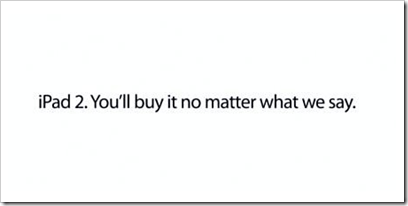
VIDEO: Conan O’Brien produces a more honest iPad 2 promo video

March 4, 2011

Yeah, that’s about right… you lemmings. 🙂

imageBest comments:

  • “What do Apple are Charlie Sheen have in common… WINNING! “
  • ”Conan is so cruel – showing apple fans world wide what is really happening.”
  • “Steve Jobs is a genius, in 1950 he created the 0 it was magical. A year later, he released the 1, without that, there would be no boolean expression! Haters, BOW!”
  • “Ironically I can’t see the video on iPad.  It’s just a black square.”
  • “Here’s the best commercial: 
    http://www.youtube.com/watch?v=8gMrG5lkYeg

Here’s the link to the video:


VIDEO: “Geek & Gamer Girls” by Team Unicorn

March 4, 2011

How the @#$% have we not signed these gals to an exclusive Xbox Live contract?  Seriously, Major.  Get your act together, dammit.  Sign.  Contract.  Now.

image

Geek and Gamer Girls Song – Watch more Funny Videos
(http://www.break.com/break-originals/other-funny-stuff/geek-and-gamer-girls-anthem)


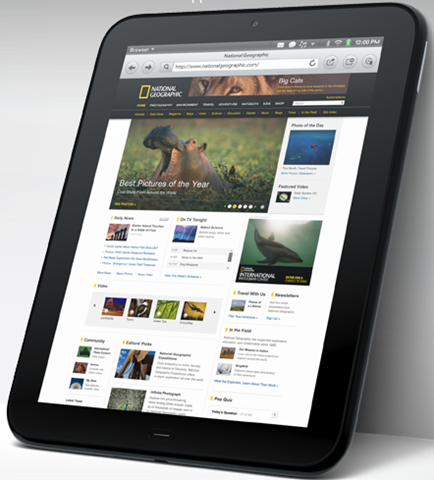
HP’s WebOS TouchPad: Someone tell me what’s the differentiator?

February 19, 2011

imageI went through a couple passes on this TouchPad announcement and I’ll probably do some more research on this later but basically, in a phrase:  I’m very skeptical.  It wasn’t as bad as Blackberry’s PlayBook mind you which appears to be a disaster and no one in the press seems to have figured that out yet, but frankly, the TouchPad doesn’t look terribly promising.

I DON’T SEE A KEY DIFFERENTIATOR
There’s not much here that demonstrably differentiates this device from the rest of the pack – iOS, Android, and yes, to a lesser extent, Windows. 

Bottom line:  Show me something that this device does that’s better than what might otherwise be done on iOS, Android, or Windows?  Now, is that capability ‘revolutionary’ enough to compel people to halt their iPad purchase?

Meanwhile HP is losing a huge source of marketing support by going with the non-Intel, non-Microsoft TouchPad. 

I have a philosophy – and I’ll bet you do too – that you need a killer feature to break out of the pack with any ‘secord-to-market’ product, especially when you’re a company like HP that’s “going it alone” against Android, iOS, and Windows-Anything without partners building their own devices & generating their own customer base’s interest in the platform.  (Remember:  This is a Palm/Qualcomm device.)  If you don’t have ubiquitous coverage to get the device to the people, you need to be able to compel the people to come to the device… and I don’t see that.

NO MORE CO-MARKETING
Remember HP’s going without co-marketing funds from Intel or Microsoft  – where, by the way, most of today’s advertising dollars comes from for OEMs like HP, Dell, Lenovo, Acer, etc.  Have you ever wondered why that Intel “DumDum,DumDUM!” logo keeps popping up in TV ads for HP, Dell, or Lenovo?  Or you see those “HP recommends using Windows 7 Professional” blurbs in the magazine ads?  That’s because Intel & Microsoft pay a significant amount of the costs of those ads to co-market HP’s products. 

This lack of co-marketing becomes a “big red warning light” to me when you realize that HP’s gotta grab consumers – not just business folk, with their TouchPad offering, meaning broad marketing & advertising is critical to getting market recognition and thus penetration.  But even with the Enterprise business set, remember that WebOS has no realistic Enterprise programmability, manageability & security strongly weakening WebOS’s position in this space.  Even Apple & Google still haven’t figured out that last bit and they’ve been around for a while.

SO, WHAT DO I CONSIDER ESSENTIALS FOR THIS FORM FACTOR?
After some thought, I came up with the following considerations as to what I think is absolutely essential as a baseline for this form factor:

  • Form Factor Utility/Price Ratio – How useful is the design relative to the price?  At what point does someone just say, “Wow.  I might as well just get a PC” versus “It’s cheap but it’s kinda useless.”
  • Practical Application Set – Does it have the most important applications, instead of “Angry Birds”?  And are they full-featured and are there decent alternatives to their desktop counterparts?
  • Palatable End User Experience – Will people like the experience?  Is it enjoyable instead of frustrating?  Does it work the way one would expect it to work?

Now here’s the technical specs:

  • WebOS w/ Activity Card interface
  • “PalmBrowser” – HTML5, Adobe Flash
  • 8000 apps
  • 1.2Ghz dual-core ARM Snapdragon
  • 512MB RAM
  • 16/32GB Storage
  • Gorilla Glass
  • 1.3Mp front facing camera
  • A-GPS
  • Stereo speakers
  • Gyroscope/Accelerometer
  • WiFi, Bluetooth
  • Mobile broadband SIM slot
  • MicroUSB port
  • Special features:
    • Touch-to-share – Share URLs by “touching” the Pre to the TouchPad. 
    • Text message sync – Synchronize text messages between the Palm Pre & the TouchPad

What stands out to me?

  • WEBOS:  The experience is good.  I’ve used it.  It’s fast and quick however it can tend to bog down just like Windows does as a multitasking OS.  The thing is, can you think of any software HP has produced or bought that’s turned out well?  I don’t mean that in disrespect – it’s a legitimate question.  Name one software product that they churn out that’s been ‘great’?  On top of that, it’s going to have no ecosystem around it other than HP providers.  They’re not partnering with anyone.   Again – NO ONE ELSE is using this OS – only HP.  No 3rd party enhancements, no non-HP designs.  I don’t even know any HP folks that own Palm Pre’s so I find it really hard to believe there’s going to be community around this device.
  • PALM BROWSER:  Yup.  Another browser to support.  Of course they highlighted HTML5 & Flash support… because from a compatibility perspective, WebOS wasn’t particularly friendly with corporate sites – witness what happens when you attempt to us it for SharePoint or moderately complex AJAX sites (A: Stuff doesn’t layout correctly, render on the screen at all, or just plain won’t drag & drop) – so they do indeed need to look ahead.
  • 8000 APPS:  And none of them are optimized for the Tablet form factor.  I’m highly skeptical about this 8000 app quote because the market’s been stale for so long on WebOS.  Meanwhile, Windows Phone 7’s marketplace is about to pass WebOS in the number of apps available.  This is after they’ve been dumping seed money into the community to create apps for the launch – what does that tell you?  Yes, they have titles like Angry Birds… but then again, the Palm Pre’s been around for a LOT LONGER than Windows Phone 7 – almost 2 years – so I’d expect better marquee titles.  But I don’t see them.
  • TOUCH-TO-SHARE:  This TouchStone gimmick is DOA as far as I’m concerned being that it requires a Palm Pre to use and only shares URLs between the two devices.  Seriously – how niche can a feature be?  This reminds me of Zune’s wireless-sharing feature which only worked with other Zunes and only shared music – not videos, podcasts, audiobooks, pictures, etc.  – and even then, the music was DRMed for 3 plays only. 
  • TEXT MESSAGE SYNC:  Again, another niche feature that’s DOA because it requires a Palm Pre.  And even if it did work with other phones over – say Bluetooth – if you’re a kid, this might be practical – going back and form between Phone & Slate.  However if you’re a kid, you won’t own one of these.  It’s not a PC replacement.

Questions I have:

  • PRICE.  Gorilla glass, dual-core processor, custom firmware on non-commodity hardware.  (No, it’s NOT a commodity.  HP’s the only one’s using this design & config.)  This doesn’t look cheap and HP’s trying to break into a market that is already got players with commoditized hardware, ecosystems, additional added income from volume revenue streams. (Android Marketplace & iTunes) A lot of their success is going to depend on if they decide to “give away razors to sell razor blades”:  If the TouchPad is priced rock bottom to make money on WebOS marketplace sales… alright, I think it’s got a chance, but HP’s gonna need a long term war chest like Microsoft’s to weather the storm like we did with Xbox, which took 8 years & $10B in investment to become persistently profitable.  (Which we will likely make up in the next 2 years alone, if you can believe that.)
  • APPS CATALOG.  After 2 years, of existence, Windows Phone 7’s total app count is going to pass WebOS’s total number of apps available this next month.  What does that tell you?
  • DEVELOPER COMMUNITY.  Unless they’ve got a program – and remember that HP isn’t a software company – that assists people in porting apps to WebOS, they’re in a world of hurt because we’ve spent a mint on this process for Windows Phone 7 and we have the most widely used development tools in the world.  WebOS uses its own IDE and it’s own application development libraries – which no one’s used before.
  • SDFLASH.  Or the lack there of.  Really?  No slot on a Tablet?  Designed for movie playback?  Photo display/collages?  Really?
  • EXCHANGE ACTIVESYNC.  It was crappy on the Palm Pre.  It’ll be interesting to see how this goes on the TouchPad.  I won’t go into the details but Palm’s support for Exchange was lousy.  For example:  You couldn’t create meetings on your calendar.
    http://pocketnow.com/tech-news/exchange-activesync-smack-down-windows-mobile-android-webos-iphone-and-s60
  • BATTERY LIFE/REMOVABLE BATTERY.  The reason people haven’t used dual cores is because battery life historically gets cut in half on mobile devices when you do.  Not surprisingly, there was no mention of battery life in the announcement or the press materials.

“Just my opinion.  Now, I could be wrong.  I’ve been wrong before.  I’m good at being wrong.  But I don’t think I’m wrong.”  – Jim Rome


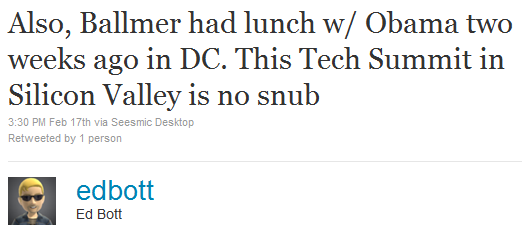
Q: Why didn’t Steve Ballmer attend the Tech Summit? A: Because he just met with Obama last month.

February 19, 2011

Much has been made about Steve Ballmer not being a the Silicon Valley Tech Summit coordinated by President Barack Obama.  The media, in their everloving verve for headlines and advertising impressions, ask the question, “Why?  Why was Steve Ballmer snubbed by the President?”

THE TECH SUMMIT WAS REGIONAL
I think the answer is best summarized by this ZDNet article:

IBM’s CEO Sam Palmisano was invited. 
HP’s CEO Lee Apotheker wasn’t invited. 
Jeff Bezos CEO of Amazon wasn’t invited. 
Salesforce.com CEO Marc Benioff wasn’t invited. 
…and yes, Steve Ballmer of Microsoft wasn’t invited. 

Because it was a regional event.  Plain and simple.

BALLMER JUST MET WITH PRESIDENT OBAMA
But I think another reason was best expressed by Ed Bott on Twitter:

image

Basically, while this opportunity is truly a rare opportunity for some, Microsoft’s leadership & founders meet with President Obama on a variety of topics on a somewhat regular basis.

For example:

Contrary to what the media wants to spin this as – this was not a “snub”.  It’s important to understand that Microsoft leadership meets with US leadership relatively frequently – and one-on-one.  There’s no need for us to participate in a tech meeting when Microsoft has individual meetings with President Obama and his cabinet.

For those wondering, “Why”… it’s pretty simple:

  • Steve Ballmer has a strong understanding of what US businesses are spending on and what their drivers are.  He has his hands on the pulse of America’s ever changing workforce and, being one of America’s biggest exporter of products to International markets, he has a keen eye on International relationships from an economic standpoint.
  • Bill Gates is worried about public education, vaccinations, the oil crisis, foreign policy, the economy. 

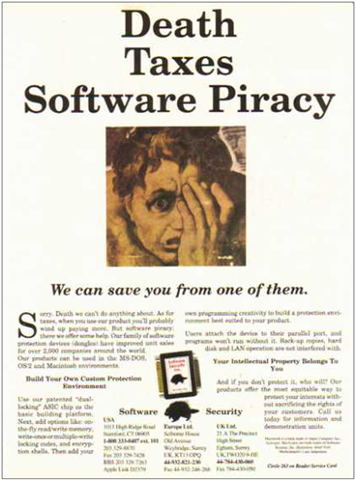
Software Copy Protection… the cat & mouse game from the 80s/90s continues into 2010 (Part 1)

February 6, 2011

imageWhen I was a kid, one of the greatest things in the world to me was the challenge of breaking DOS copy protection of the time.  And yes, this implies that I pirated software when I was in Junior High.  I fully admit it.  Hey – I had an allowance of $3/week.  What do you want?

While I sometime leveraged tools like CopyIIPC & the Central Point Option Board, I’m dead certain I spent far more time in DEBUG.EXE searching machine code for INT 13’s than actually using any of the software that I pilfered… and with good reason:  I had copies of products like “Multimate”, “dBase III”, “Cornerstore”, “Lotus 123”, “WordStar”, “Framework”, & “Mavis Beacon Teaches Typing”.

…what 13 year old kid is interested in any of that?  (Especially the Mavis Beacon product:  I already typed 80 words per minute back then)

BUT WHY?
Much like how a hacker’s goal isn’t necessarily to do anything with the computer system they’re attempting to infiltrate but rather simply to see if they can break in, the wondrous goal of cracking copy protection was simply the knowledge of being able to subvert the protection.  Nothing bored me more that some company that just used lame copy protection that could be subverted with a single machine language instruction change.

You have to understand that this was a cat & mouse game:  Breaking copy protection was like puzzle solving and the challenge was delicious.  Creating copy protection however was the art of making the puzzle & I to this day, greatly admire those that create these techniques.

TECHNIQUES?
Y’see every copy protection is a bit different but the underlying principle is the same:  Make it very difficult for a piece of software to run if it’s a copy of any original.  How this is done varies greatly using some very clever techniques however, it does follow a similar framework:

  1. Run application (via boot or executing a program)
  2. Check for some attribute of the disk/software that is very difficult to duplicate
    1. If the attribute is verified – the software is an original legal copy… continue execution
    2. If the attribute is not verified – the software is an illegal duplicate… halt execution

Very little of this appears to remain documented on the Internet but I hope that some day someone will write a documentary about this back & forth that continues to this day.  I’m going to blog a few of the techniques & their names that I remember off the top of my head in subsequent posts.


Children speak the truth… even when they don’t speak.

February 2, 2011

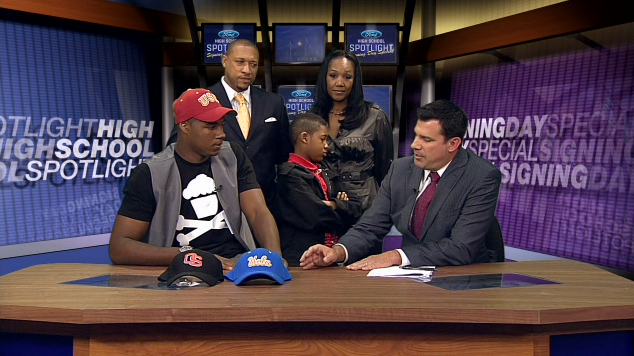
imageWanna see the quintessential “tell”?  Today, Torian White, a Scout.com 4-star Offensive Tackle recruit announced on FOX Sports that he was going to USC. 

Why is this a big deal?  Torian originally committed verbally to UCLA.  Here’s the video:

Putting aside any biases toward either school, this video you tells everything you need to know about how his family felt about the surprise announcement and is otherwise a case study in “facial tells”.   Take a look at some key moments:

  • :48 His brother Jason White cracks a grin, then slyly looks down.  You can see his cheeks puff a little as Torian’s ready to pick a cap – this is a smile.
  • :56 Jason looks up with obvious surprise as the FOX Sports broadcaster says the words, "You’re going to USC?".  Take a close look here:  Eyebrows suddenly raised. forlorn cheeks, loosened mouth muscles.  The expression on Jason’s face is unmistakable:  Surprise & disappointment.  
  • 1:26 At the biggest moment in Torian’s life to date, Jason is faced 180 degrees away and won’t even look at him.  Crossed arms, he looks up suddenly at his Mom.  (Who is clearly ecstatic, while his father is not.  More on that later.)
  • 2:00 After looking up at his Mom and saying something, he faces the camera and unconsciously shakes his head, his bottom lip pursed in pout.

…there’s a ton of other tells but you get the picture.  And speaking of tells, Joe White made a comment that you can read in UCLA forums about "people pushing Torian toward USC" but didn’t disclose who those people were, but if you listen to the uncontrolled female squeal of delight at :59, and I think you’ve got your answer as to who those people were.  Need more?  Watch the following minute after :56 and there is only one person on camera that’s smiling, and it’s not Joe, Jason, or Torian.

(Epilogue:  Later that day, Torian White changed his mind and reversed his decision.  He’ll be suiting up for UCLA this fall.  Go Bruins.)


How I printed a chapter from a Kindle eBook

January 31, 2011

imageAs I mentioned before, I love my Kindle.  It single-handedly brought back the joy of reading to me.  Besides my Windows Phone & my FitBit, it’s the single most used consumer device I own.  (Not counting my laptop of course)

Recently, I’ve been finding great use however for printing a chapter or two of the eBook I’m reading.

WHY DID I WANT TO PRINT A CHAPTER OUT OF A KINDLE EBOOK?
I keep finding myself in situations where having printed DISPOSABLE 8.5×11 pages of part of the book I’m currently reading is very useful.  For example:

  • when you’re hiking to a location and don’t want to risk bringing a $200 reader with you, but a few sheets of disposable paper would be perfect to throw away later
  • you’re near a water source and/or a very hot, exposed area – like the pool – and you don’t want to risk ruining your eBook reader
  • you’re in a place where having a book wide open would be rude and/or frowned upon – or eBook readers & other electronics are prohibited from use, but having a few pages of paper in a portfolio might keep you “under the radar”

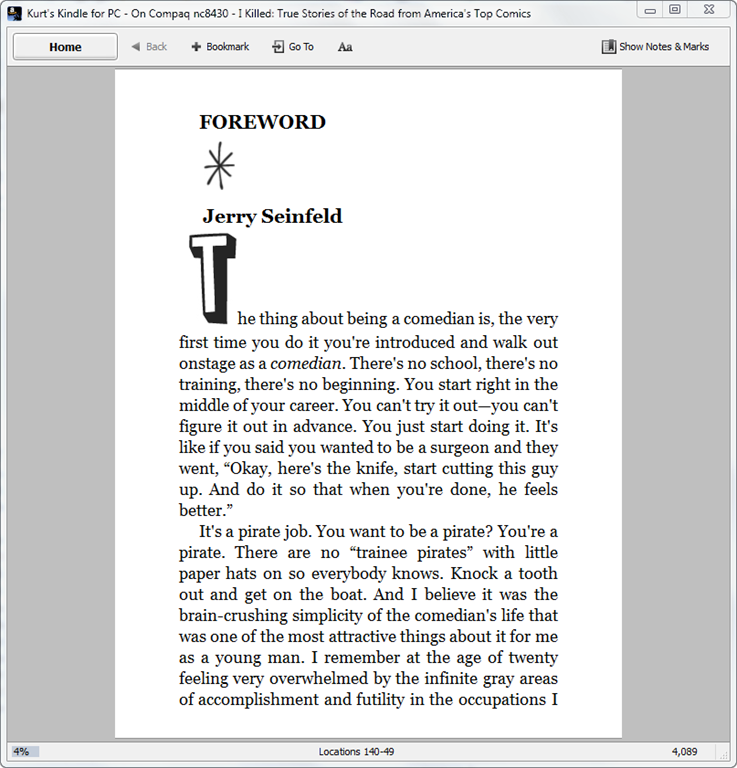
Most recently, I was on a long flight and I had my Kindle out, reading a particularly engrossing book called “I Killed: True Stories of the Road from America’s Top Comics“ about the stories comedians have collected while on the road going from city to city, and despite the low wattage consumption of the Kindle’s digital ink electronics, I was sternly told to immediately shut the device down because we were about to take off.  So for the next 20-30 minutes while we left the gate, puttered around the tarmac, and climbed to 10,000 ft, I was to be held captive to SkyMall?  Not me… printed chapter to the rescue!

HOW DID I DO IT?
It essentially just required decrypting the eBook itself, then converting the eBook to a printable format.  First, I downloaded a set of tools:

  1. Kindle for PC/Windows 1.01 Beta
    Using the early versions of Kindle for PC makes this possible.  Newer versions are more difficult to deal with apparently – hence the reason I used the 1.01 Beta which is freely downloadable from FileHippo.
    http://www.filehippo.com/download_kindle_for_pc/
    download/2e24d3f4e48ab7ad69d1e21f46a54700
  2. ActiveState’s ActivePython Windows 32-bit Runtime
    This needs to be 32-bit by the way even if you have 64-bit Windows 7.  The 32-bit runtime can be installed without a problem,  When I attempted to try the decryption tools on x64, it resulted in errors that said, “Could not read from memory…”
    http://downloads.activestate.com/ActivePython/releases/2.6.6.15/ActivePython-2.6.6.15-win32-x86.msi
  3. Apprentice Alf’s decryption tools
    These tools are stored in an archive called “tools_v2.2a” and contain Python scripts that strip the DRM off of .MOBI formatted eBooks that my Kindle reads.  I unpacked the contents to a directory called "\tools_v2.2a” – including the directory hierarchy.  I have to admit that despite knowing very little about Python, the power of these scripts that are run in an interpreter is very impressive.  There is no binary code involved in the DRM stripping process outside of the Python runtime engine which should have been previously downloaded.
    http://www.mediafire.com/?8mzrezba1bvmuqd
  4. Calibre eBook Management Software (Windows XP/Vista/7)
    This is, among other things, an eBook conversion tool that converts Kindle eBooks (.MOBI files) to other formats, namely Rich Text Format (.RTF files), a Microsoft Word readable & printable format.
    http://calibre-ebook.com/download_windows

    (NOTE:  When I clicked on the download link for Windows, I discovered that the browser doesn’t appear to do anything for a while.  The web site did something odd which is to immediately start downloading the entire 36.5MB software package to my machine over HTTP I got no notification that this happening.  Once it was downloaded, a dialog box appeared on my screen asking if I wanted to save the Calibre installer package file and where I wanted to save it to.  Once I selected a folder to save the package, it immediately moved the downloaded file to the selected folder and was done.

I installed the first 3 tools – all of which will be involved in making the eBook readable by Calibre – and then installed the Calibre software to perform the conversion to a printable, flexible document.  (Again, as a reminder, the decryption tools should simply be unzipped to "\tools_v2.2a” while MAINTAINING THE FOLDER HIERARCHY IN THE ARCHIVE so that you get the right files files grouped into the right folders) 

I did a little bit of preparation with the apps configuration before I proceeded:

  • KINDLE FOR PC (Windows)
    Once you’ve installed Kindle for PC, I signed in and downloaded the books I had access to.  Test that you can read the books within the desktop reader:  If you can’t read the books on the PC, you won’t be able to decrypt them.
  • ACTIVEPYTHON 32-BIT (Windows)
    I ran the 32-bit version regardless of whether or not you’re running a x64 version of Windows.  64-bit Python won’t run the scripts properly.
  • APPRENTICE ALF’S DECRYPTION TOOLS
    The directory you’re looking for is called:
    \tools_v2.2a\tools\Kindle_Mobi_Tools\Kindle_4_PC_Unswindle

DECRYPTING AN EBOOK
The “Unswindle” script is called “unswindle_v7.pyw”.  It is a little slow but it will automatically open the Kindle for PC application, then wait for the user to open an eBook.  Once I did this, I closed the Kindle for PC application & the script continued.

In the background, the Unswindle script captures the key necessary to decrypt the entire eBook.  Now that it has that in memory, it can process the eBook, decrypt it’s contents, and write a DRM-free version to my hard drive.  The script will open a dialog box that will ask for the name of the file to assign to my newly DRM-free .MOBI eBook.  I typed it in and it saved the eBook to disk without any DRM.

CONVERTING TO .RTF
Now that I had the eBook available without DRM, the rest was simple.  I had installed the Calibre software previously by double clicking on the downloaded .MSI installer package, at the time called something like, “calibre-0.7.43.msi”.  I followed the installer instructions just like any other new software installation.

The Calibre software is very easy to use. 

  1. Begin by running Calibre and keep it on the desktop. 
  2. From the desktop, I was able to drag & drop the eBook .MOBI file that I converted from its folder directly onto the Calibre application to add it to its library.  (Alternatively, I was also able to open Calibre and click the “Add Books” in the upper left hand corner to add the book to the Calibre library to start working with it – or more specifically begin converting it to a printable format.)image
  3. I right mouse button clicked on the title I was going to ultimately print.  A menu appeared that allowed one to select “Convert Books”.  I selected “Convert individually” from there which initiated a new window.
    image
  4. I changed the output format by clicking on the drop down list box in the upper right hand corner labeled, “Output Format” and changing this to “RTF”.  (Rich Text Format)

    image

  5. I clicked OK.  This apparently triggered the conversion process.  A “swirely” actively moved at the bottom right hand corner labeled, “Jobs: 1”.  When this was completed, it read “Jobs: 0”.
    image
  6. I clicked on the book that had been converted:  A new “formats” hyperlink had appeared for “RTF”.  I clicked on the RTF hyperlink and Microsoft Word started and it loaded up the book… ready to be printed.image

image

Now that the book is in a format that can be printed, I was able to have a single chapter on paper to keep in my portfolio for whenever I wanted to read… without taking out either my Windows Mobile/Phone or my Kindle.  This is particularly useful when the book’s chapters are disjointed and don’t depend on each other.  Printing an ENTIRE book is generally silly because you end up with so many unbound pages as to be simply too bulky to carry.

—————————-

WHEATON’S LAW APPLIES
It again warrants reminding people that just because the ability to print eBook content exists, doesn’t mean anyone should ever deprive hardworking authors of their livelihoods.  This process was for my personal use only & Wheaton’s Law most definitely applies.


A quick word on QNX & the Blackberry Playbook

January 26, 2011

imageFor the record, lest you think me biased against an operating system that 99% of the world doesn’t know by name or acronym:  I once worked on business critical development projects that depended on QNX.  Yes, I know its strengths.  QNX is the reason Playbook does multitasking so quickly and the interface is so smooth.

Back in my younger days, I worked for the #1 credit services provider in the world (you figure it out) and when you slide your credit card through that terminal at Ralphs/Kroger, your card information matriculates over a phone line (a asynchronous modem primarily back then) through a series of systems and ultimately, if it’s over a certain charge value threshold, gets authorized by the bank that issued the card to you.  That bank received the transaction through an Intel-based PC… running the QNX operating system.

LOW LATENCY, HIGH PERFORMANCE
QNX was chosen back then for its speed & immediacy.  It’s actually a really interesting & impressive operating system.  Unlike Windows 7 and most *NIX-based systems, it’s an ultra-quick, real time kernel-based operating system with single millisecond-level latency, suitable for heart regulators & other medical devices, fast twitch financial transactions such as trading floor applications, or mission critical operations on the Space Shuttle. (In this sense, it’s more closely related to Windows CE)  The maximum threshold for credit authorization transaction turnaround was 7 seconds so it was critical that there be absolutely no delays between the bank that maintains your credit, and the terminal you swiped your card at.

For all its performance, I should point out that QNX has historically had rather raw development tools.  Sure it’s gotten more mature over the years but it’s never been anywhere near what consumer electronics application developers get with Apple’s iOS Xcode, much less Microsoft’s Visual Studio Suite in terms of productive development.  It’s a fast, tight nimble OS… with very few users.  It was said back in the day that QNX – a Canadian company, hence the unsurprising acquisition by another Canadian company (RIM) – lived off the licensing fees from just a couple dozen licensees throughout the world – but because the OS was so absolutely critical to the operations of these licensees (like the aforementioned credit systems provider), QNX never had anything to worry about. 

Then one day, I guess it got acquired.  Not for medical devices.  Not for financial transactions.  But for consumer phones/tablets.  Yup.  A solid OS with strengths in performance… specialized vertical industry use cases… now being used for a PDA.  It just seem like a square peg in a round hole to me.

“I could be wrong.  I’m often wrong.  I’m good at being wrong.  But I don’t think I’m wrong.” – Jim Rome


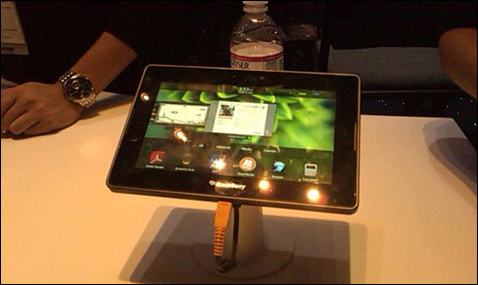
Blackberry Playbook: Are you kidding me?

January 24, 2011

image

No, really – please.  Someone tell me what everyone is smoking?  Everywhere I go I hear people talk about the Blackberry Playbook as if it were better than sliced bread.  They talk about how pretty and fast the UI is… but then, NOTHING.  It’s as if they never really used it at all.  Nobody I’ve talked to can point to what makes them so excited over the device.

Now I sat down with this thing for over an hour and in Las Vegas and grilled the RIM booth team for the Playbook on the CES floor about this that and the other.  And in the end… I still don’t get it.  Very little about this device says ‘winner’ at all.  Check this out:

  • WiFi-only at launch.  I repeat – from RIM: the people that brought you the mobile email device – there’s no cellular connectivity on this device at launch.
  • Email only works by ‘pairing’ with your existing Blackberry.  This essentially provides a ‘new interface’ for the mail you’re already getting on your phone.
  • No physical tethering.  Only wireless.
  • No replaceable battery.
  • There will be cellular at one point & it’ll be exclusive to Sprint once it’s available.  CDMA.  This of course means that Blackberry customers on AT&T & Verizon – the business networks – are out-of-luck.  And International travel is out the window.
  • US-only.  No Canada.  No Europe.  No Far East/Asia.  No LATAM.  Did you catch that?  RIM’s own home country of Canada won’t be seeing the Playbook available.
  • QNX OS-based Part 1.  This isn’t Android or iOS:  There’s no existing application library.  Worse, there’s zero compatibility with existing Blackberry applications.  Not even an emulator.
  • QNX OS-based Part 2.  Completely new 1.0 development environment, meaning existing Blackberry developers will need to learn to develop to a new platform.

Now in fairness, here’s a few things that might turn your eye:

  • Dual core TI OMAP processor (Ooh)
  • 3Mp front facing camera; 5Mp back facing camera
  • Small form factor with a quick, smooth, multitasking UI

…and that’s all I got. 

Someone tell me what I’m missing that’s got everyone hot under the collar for this thing?


Observations about LG at CES2011 & their recent comments in the media about Windows Phone 7

January 16, 2011

Y’know, recently I’ve been reading a lot about LG Electronic’s comments regarding Windows Phone 7.

The quote that’s getting a lot of airplay is this one in particular:

“From an industry perspective we had a high expectation, but from a consumer point of view the visibility is less than we expected”, James Choi, marketing strategy and planning team director of LG Electronics global said.

When I first read this, something about it bothered me because I just got back from CES 2011 in Las Vegas and in perusing their booth  – which incidentally, was one of the top 5 largest in the Central Hall at the Las Vegas Convention Center (it took a couple minutes to walk across it at a steady pace) – and despite allocating about 25% of their booth space to their mobile phone offerings, they had almost no floor space dedicated for their lone US entry into the Windows Phone 7 space as far as I could see.

REALLY?
To put this into perspective, the following photo is the only place that the LG Quantum was even on-display, much less available to the public to touch, try, use:

image

Youi’ll notice that the device on display is BEHIND GLASS.  It’s also not even on.  There’s no literature available and had no one near it from LG representing the device to talk to anyone about what it does.  In fact, the only indicator that it RAN Windows Phone 7 as an operating system was the Windows logo on the glass and the TV ad that ran in the white screen below the logo.  Naturally, there was no one interested in the phone at all since they didn’t know what it was.

To put this imbalance at CES into perspective, imagine your entire house being covered with Android phone marketing & representatives from LG talking about Android.  The walls, the coffee table, the shelves, the cabinets, the windows, etc. would be covered with demos & booth staffers holding LG Vortex devices & other Android phones. Now imagine all of your family members talking to people that come through your house about the Vortex or another Android offering LG has.

Now at the same time, imagine the bathroom sink console in the guest bathroom having a Windows Phone 7 on it, but behind glass with no one around it.  That’s about the extent of LG’s marketing for the device, yet they go and say, “…the visibility is less than we expected.”

Understand why I’m a little tweaked?

I HEART LG QUANTUM
Now, for the record:  I LOVE THE LG QUANTUM.  I have one, and it’s the first Windows Phone 7 device that I’ve owned and I don’t regret it one bit at all. 

For anyone reading this, here’s why:

  1. KEYBOARD
    It’s the only Windows Phone 7 device on AT&T with a keyboard.  Done.
  2. BATTERY LIFE
    The battery life is clocked at being at/near the best of all Windows Phone 7 devices offered in any market – US or International – and on any network – AT&T or T-Mobile.
  3. SOLID CONSTRUCTION
    Despite providing a slide-out keyboard, the unit feels good in your hand with a good weight and interestingly enough, a cold, brushed metal plate protecting the battery.  If the capacitive screen had Gorilla Glass like it’s bigger brother the LG Optimus 7, I’d be in hog heaven because it’d be near-indestructible.
  4. DESIGN TOUCHES
    USB connection on side, brushed metal plate on the back, large landscape keys on the keyboard, physical Windows/Start Page button.
  5. DLNA SUPPORT
    This is the unique ability to transmit stereo audio wirelessly over 802.11g to my Xbox 360 and play the music over my Bose home theatre stereo system.  My new phone is a “Zune” and is now fully connected to my living room’s home audio.
  6. EXCLUSIVE SOFTWARE
    There’s one application that comes exclusively with the LG Quantum that I want to highlight and that’s “Voice-to-Text”.  It’s a simple tool that allows you to speak into your phone and translate your voice to text for immediate use in a SMS Text Message, Email, Memo-to-yourself, Twitter Tweet, or Facebook Status.  Yeah.  Awesome.  And only on the Quantum.

So LG?  Amongst all the SmartTV stuff, vacuums, washing machines, prototype closet organizers, all of which had a lot more people & floor space dedicated to them… next time, y’think you might be able to spare at least ONE table for your Windows Phone 7 device with a staffer that knows something about it?

Please?  Just a thought.