Reading Aurebesh: The Star Wars Galactic StarCruiser playDisney app

July 25, 2023

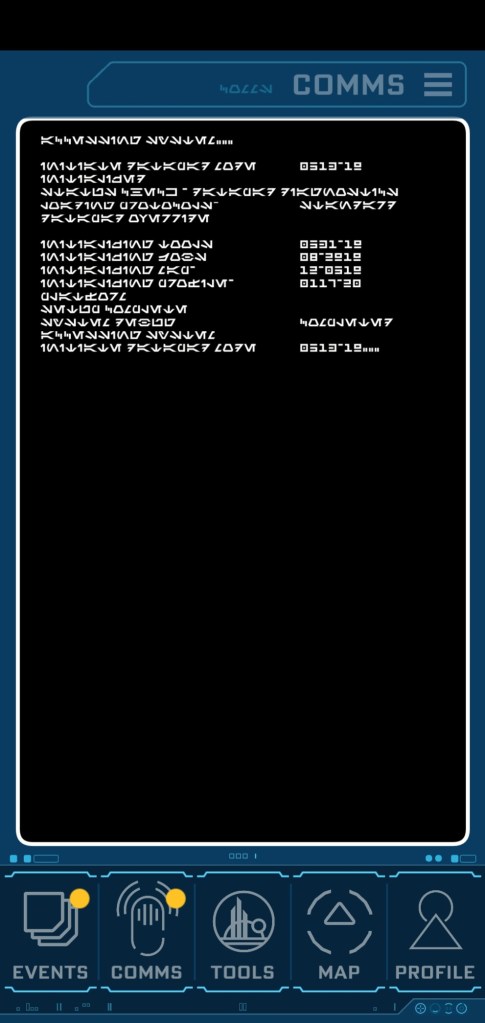
For anyone interested in the #StarWars #GalacticStarcruiser datapad Aurebesh start screen from the #playDisney app… and its English translation:
—-
ACCESSING SYSTEM
INITIATE DATAPAD MODE… 0513-19
STATUS CHECK – DATAPAD DIAGNOSTICS
LOADING PROTOCOLS… STANDARD
DATAPAD OVERRIDE

INITIATING TOOLS… 0531-19
INITIATING FORM… 08-2919
INITIATING MAPS… 12-0519
INITIATING PROFILE… 0117-20
PLATFORM
SETUP COMPLETE
SYSTEM DEBUG… COMPLETED
ACCESSING SYSTEM
INITIATE DATAPAD MODE… 0513-19


Star Wars Galactic Maps for Geeks like me

July 25, 2023

This map that I bought was found on Etsy. Super clear & easy to read when purchased at movie poster size. I had the framed and mounted on my wall.

https://www.etsy.com/listing/947810326/stars-wars-galaxy-map-high-definition

Also found this one which was cool in that it showed Canon vs Legends, but the creator doesn’t provide any “higher” res images so it’s hard to see the detail or accuracy.

https://www.redbubble.com/i/poster/The-Galaxy-by-DavidDentAM/44588637.E40HW


Why the Star Wars Galactic StarCruiser failed

July 25, 2023

People – particularly folks without the money to do so – are quick to whine about the cost of the Star Wars Galactic StarCruiser & declare that the reason it failed.

That wasn’t the reason. Then what was?

Disney marketed the #StarWars #GalacticStarcruiser to the wrong people.

I am the demographic. I can afford to go multiple times on the Star Wars Galactic StarCruiser. And I did.

The problem was Disney severely miscalculated that their in-house wave 2 & 3 target audiences would put butts in rooms.
✅ Wave 1, as everyone knows, were diehard Star Wars fans. “We’ll pay any amount” types.
✅ Wave 2 were Club 33 & Golden Oaks folks. Heavy disposable income Disney-philes.
✅ Wave 3 has been Disney Vacation Club, Magic Key & previous StarCruisers.

Unfortunately, I think Disney over-estimated the value of their own marketing for the consumers they are trying to attract. I think they believed their customer databases have the right demographic for #StarWars #GalacticStarcruiser: “A family with the disposable income to double the cost of an Orlando vacation by adding a 2-day stay at SWGS”

The closest thing I can think of is their lists for ‘Disney Destinations’ customers: People that can pay $25K for a 3-person 7-day trip to Japan.

I originally suggested dropping the in-house Disney customer lists & consider marketing direct to GenX nerds at Microsoft, Google, Amazon… geeks with disposable income. These folks have the “ability” to take such a trip & would also likely be very “interested” if they knew about the SWGS.

And if given some sort of compelling event (a limited time offer?) getting them to make a reservation would be easier.

Honestly, as a nerd, my nerd friends & I didn’t even know about the SWGS initially.


Released online: Star Wars: Galactic Starcruiser (Original Soundtrack)

July 25, 2023

ICYMI: Star Wars: Galactic Starcruiser (Original Soundtrack)

Spotify:
https://open.spotify.com/album/2wFDrfFxN47l0Eq7zeK8wQ?si=-t-5QYQJRfqLrXCEamubQg

Amazon Music:
https://amazon.com/music/player/albums/B0C3Q84D9K?marketplaceId=ATVPDKIKX0DER&musicTerritory=US&ref=dm_sh_YLzY2Ny87WxLsUsCTIqWwUixB

#starwars #GalacticStarcruiser #gaya


The Halcyon Forever shirt

July 25, 2023

Interested in that “Halcyon Forever” t-shirt that all the Star Wars podcasters have been wearing commemorating the Galactic Starcruiser ?

It turns out that all proceeds go to the Make-A-Wish Foundation.
https://www.teepublic.com/t-shirt/45489473-forever-white
#StarWars #GalacticStarcruiser #Disney


Barack Obama’s Advice on What to Learn to be Successful in an Organization

July 23, 2023
Barack Obama’s advice to young people about how to succeed in an organization

“Just learn how to get stuff done.

And what I mean by that is, I’ve seen at every level, people who are very good at describing problems. People who are very sophisticated in explaining why something went wrong or why something can’t be fixed.

But what I’m always looking for is, no matter how small the problem or how big it is, someone who says, “Let me take care of that.”

If you project an attitude of whatever it is that’s needed, I can handle it – I can do it, whoever is running that organization will notice, I promise.

Which is why for young people I always say, you don’t always need to be so impatient – asking for the plum assignment. A lot of times the best way to get attention is, whatever is assigned to you, you’re just nailing. You’re killing it. Because people will notice and say, “Oh that’s someone who can get something done.””


Stardock Multiplicity Settings for KVMPro Connectivity

July 7, 2023

[Archive post for future reference]

If you use Stardock Multiplicity, I obtained the following from their Support team on getting it working across multiple desktops.

———————-

Ensure you have the latest and same version of MP software installed on each machine; one as a Primary another as a Secondary. You can check your version on the ‘Help’ or ‘About’ tab in MP. You can get the current version on your account page:
https://store.edgerunner.com/account/downloads

Next (and important), try rebooting every MP machine, as well as the connected router, and testing the connection again.

Next, you will want to ensure that all the MP rules are in your firewall on ALL MP machines:
http://sd.stardock.com/sean/jingimages/2014-04-07_1524.png
http://sd.stardock.com/sean/jingimages/2014-04-07_1514.png
-Multiplicity Audio Service: 30567
-Multiplicity Clipboard: 30565
-Multiplicity Service: 30564
-Multiplicity Remote Screen Service: 30569 (MP3 only)

Are set for Domain, Home or Private, NOT Public.
http://screencast.com/t/Pc3CLmeG

With that, you are going to want to ensure that the network you are connected to is indeed one of them:
http://sd.stardock.com/sean/jingimages/2014-03-26_1111.png

Changing Windows network type should you need to:

If this fails, shut down any \ all Firewalls entirely and try to connect again:
Windows: http://sd.stardock.com/sean/jingimages/2014-05-12_0945_002.png

Is this a Seamless or KVM connection you are having trouble with? If KVM, please ensure it is enabled on the Secondary:
http://screencast.com/t/NgBLyB3us

Also note, that you cannot connect to a Windows XP machine via KVM mode. The errors will be that that it is a firewall issue or that KVM mode is not enabled.

When you try to connect to the other machine, are you getting the connection success window?

If that still fails, remove the Secondary connection completely:

And re-adding the connection by the Secondary’s IP instead of the host name:
Example: http://sd.stardock.com/sean/jingimages/2014-06-03_0832.png

Are you getting any errors? If so, what are they, and when do they occur? Would you be able to reply with any screenshots that would help illustrate your issue? Specifically, we would like to see the connection message you are getting when you test the connection type you are trying to set up:

Also, please download and run the following utility on the Primary and only one non-working Secondary.
http://sd.stardock.com/ERSupportTool.exe

This is a tool that we use to gather relevant log files and basic information about your computer. Once the utility finishes running, please send back the .zip files it creates on the desktop.